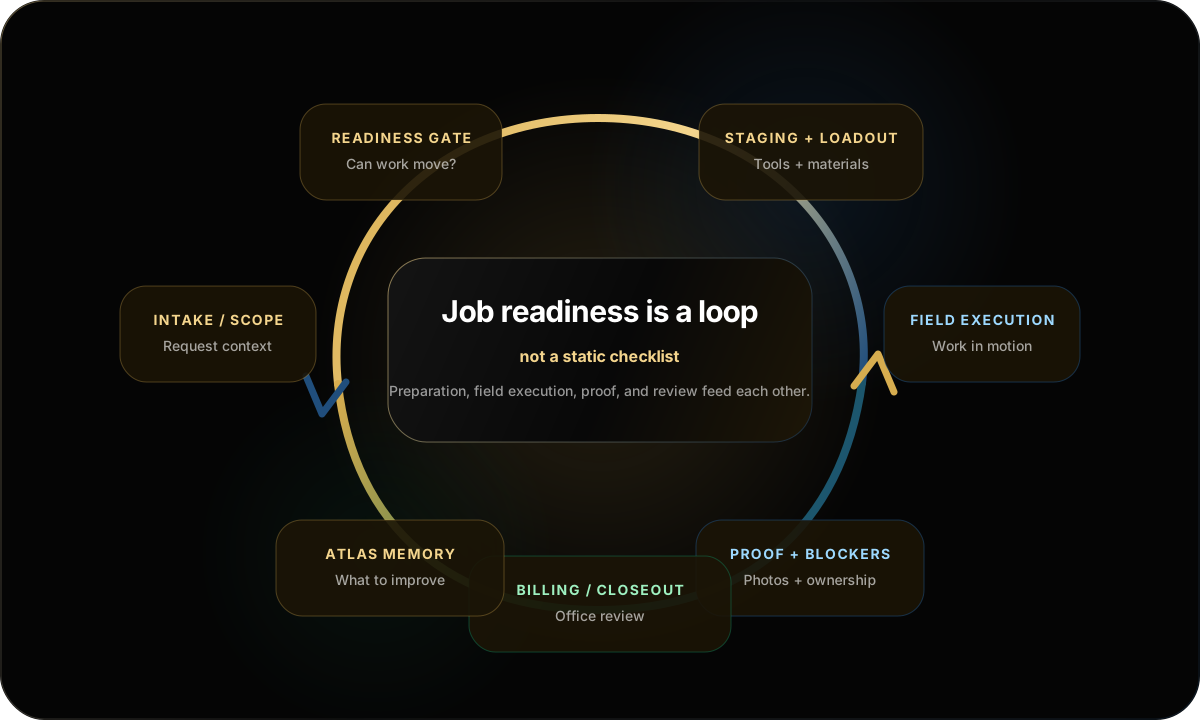
Job readiness is the difference between a project that looks scheduled and a crew that can leave prepared. Most field chaos starts before the truck ever leaves the shop.
By Emanuel Petru Manea, Founder / Owner-Operator, BuildPod LLC
Short answer
Job readiness means the work is prepared enough for a crew to move without guessing: scope is clear, people are assigned, tools and materials are staged, blockers are owned, proof expectations are known, and the office can support the job after the truck leaves. The problem is that most crews do not fail because they lack effort. They fail because one missing detail turns into a store run, a phone call, a return trip, or a billing delay.
Share this field note
Instagram: copy caption/link and paste into story, bio, caption, or DM.
BuildPod treats job readiness as a loop: intake, readiness, staging, execution, proof, review, and operating memory.
What job readiness means
A job is not ready just because it is on the calendar. A schedule can tell the crew where they are supposed to be. It cannot prove that the right fasteners are in the truck, the customer’s scope change made it to the field lead, or the office knows what proof it needs before billing.
In construction, job readiness is the operating state between the estimate and execution. It answers a blunt question: can the field team leave prepared, or is the day about to start with calls, missing items, unclear ownership, and owner memory holding the operation together?
Field example
The 7:12 a.m. problem
The crew is ready to leave, but one tool battery is dead, the material list changed yesterday, and the customer’s approval photo is still in someone’s text thread. Nobody did anything “wrong.” The job simply was not ready to move.
Why scheduled work still fails in the field
Most contractors lose time in the gap between planned work and executable work. The job may be sold, entered into software, assigned to a date, and discussed in a meeting. But if the trailer is loaded for yesterday’s job, the material pickup has no owner, or the proof requirement is buried in a text thread, the plan still fails in the field.
Project tracking matters, but field execution needs operating clarity. The crew needs to know what is ready, what is still open, what to bring, what to document, and who owns the issue if something is not ready.
This is where a job readiness software layer becomes different from a basic task list. The goal is not more fields to fill out. The goal is to make readiness visible before the truck, van, trailer, or pod moves.
The contractor job readiness checklist
A contractor job readiness checklist should be practical. It should answer whether the work can move professionally, not just whether someone created a task. Start with these checks and adapt them to the kind of work your crews perform.
Scope is clear
The field lead knows what work is happening, what changed, what is excluded, and what decisions are still open. If the PM knows the customer changed the scope but the crew never sees the note, the job is not ready.
Crew is assigned
The right people are assigned, not just whoever is available. Readiness includes skills, timing, access, language expectations, and who owns the job when a field decision comes up.
Tools are staged
Required tools, kits, specialty equipment, batteries, chargers, and consumables are staged before departure. A missing bit, dead battery, or charger left at the shop can turn a simple morning into a return trip.
Materials are confirmed
Materials are available, correct, and tied to the job context. That means quantities, substitutions, pickup status, delivery timing, and who owns the shortage if something is not ready.
Trailer, van, or pod matches the job
A trailer can be loaded and still be wrong for this job. Loadout readiness asks whether the physical work system supports the actual scope scheduled for that day.
Proof requirements are known
The crew knows what photos, notes, approvals, completion records, or issue documentation the office will need later. Proof is easiest to capture while the work is happening.
Blockers have owners
Every open issue needs a person and next action. A missing material, unclear scope note, or customer decision can sit in the gap because everyone assumes someone else handled it.
Billing and closeout path is understood
The office knows what must come back from the field to support billing, closeout, customer follow-up, or a next-phase decision.
Common signs your jobs are not ready
Readiness problems usually show up as small frictions before they look like a large operating problem. Watch for these patterns:
Morning confusion about who is going where
A crew leaves with the wrong trailer
Battery chargers or specialty tools are still at the shop
Materials changed yesterday but the field lead never saw the update
Photos are buried in a text thread instead of attached to the job
Nobody owns the blocker, so everyone waits
The crew can do the work but cannot prove what happened afterward
The office cannot invoice because completion proof is missing
Avoidable store runs after dispatch
Field example
The work happened, but the office cannot prove it
A field lead fixes the issue, sends two photos by text, and moves on. Three days later, the office is trying to invoice or answer a customer question with no clean record tied to the job.
Field example
Everyone saw the blocker. Nobody owned it.
A missing material, unclear scope note, or customer decision can sit in the gap between field and office because the system never assigned ownership.
Field execution is not just a software problem
Job readiness sits next to safety, documentation, workforce pressure, material flow, and customer communication. Software can help organize the work, but the operating model still needs clear ownership, review-required language, and human judgment.
For source context, start with public safety and industry resources from OSHA, OSHA Hazard Communication, NIOSH, and NAHB. This article does not rely on invented productivity statistics or fake benchmark numbers.
OSHA
Federal workplace safety resources and regulatory context.
BuildPod replaces the daily operating patchwork between the estimate and the work getting done. The BuildPod OS platform is designed around an operating loop: intake, readiness, staging, field proof, blocker ownership, and office review stay connected.
Intake / scope
Turn vague requests, project notes, photos, and customer context into a clearer starting point before work is scheduled.
Readiness gate
Separate scheduled work from executable work by asking whether scope, crew, assets, staging, blockers, and proof are ready.
Staging + loadout
Connect tools, materials, vehicles, trailers, pods, kits, and physical prep to the job before the team leaves.
Field execution
Give field users the job context they need without making everything another text thread.
Proof + blockers
Keep photos, notes, issues, ownership, and field status attached to the work record while the job is active.
Billing / closeout
Bring completion context back to the office so billing and closeout do not depend on chasing memory after the fact.
ATLAS / operating memory
Summarize operating signals so owners and operations teams can see what needs attention next.
The software path is separate from physical deployment. Physical trailers, pod deployments, implementation advisory, workflow audits, and operations redesign are handled separately through BuildPod LLC. That distinction matters: software pricing and operational deployment support are not the same thing.
How to start improving job readiness this week
You do not need a perfect system to start improving readiness. Pick one job type that regularly creates confusion and run a simple readiness review before the crew leaves.
Write down what must be true before the job can move.
List the tools, materials, trailer, vehicle, or pod requirements.
Name the person who owns each open issue.
Define what field proof the office needs before billing or closeout.
Review one completed job and identify where the handoff broke.
Readiness should not live in one person’s head. It should be visible across the office, staging area, trailer, crew, and field record. That is the difference between a checklist someone forgets to update and an operating system that helps the team see what can move next.
If your company depends on vans, trailers, pods, tools, staged materials, field proof, and crew handoffs, job readiness is not admin work. It is the work that protects execution before the day begins. BuildPod connects staging and loadout software, field operations software, and tool trailer operations software into a clearer operating path for field-heavy teams.
Operator Network
Want to compare readiness practices with other operators?
Explore the BuildPod Operator Network, a private operating exchange forming around readiness templates, safety documentation playbooks, field-proof standards, operational debriefs, and future benchmark categories.
Build a readiness-first operating workflow before the crew leaves.
BuildPod OS is being shaped with operators who want the work, people, assets, staging, proof, blockers, and office review path connected before execution starts.
Job readiness means the work is prepared enough to move without guessing: scope, crew, tools, materials, staging, blockers, proof, and communication are clear enough for the field team to execute.
What is the difference between job readiness and project management?
Project management tracks the plan. Job readiness checks whether the plan can actually be executed by the crew with the right people, assets, materials, and proof path in place.
What should be checked before a crew leaves the shop?
Check scope, crew assignment, access, tools, materials, trailer or vehicle loadout, customer communication, open blockers, proof requirements, and billing or closeout needs.
How does job readiness affect billing?
Billing slows down when proof, completion notes, change context, or issue ownership is scattered. Readiness improves the chance that the right field proof comes back with the work.
Can software help with job readiness?
Yes, when the software connects readiness, staging, field proof, blockers, and office review. A task list alone is usually not enough for field-heavy operations.
Share this field note
Instagram: copy caption/link and paste into story, bio, caption, or DM.
Founder of BuildPod OS and Owner-Operator of BuildPod LLC
Emanuel Petru Manea is the founder of BuildPod OS and owner-operator of BuildPod LLC. His background includes military helicopter electrical and aviation maintenance work around UH-60 and CH-47 aircraft systems, CFI / CFII / MEI flight instruction, Assistant Chief CFI experience in a Part 141 training environment, airline operations with regional jet and Airbus A320-family experience, and an ATP certificate. BuildPod was created from firsthand frustration with disconnected field operations, tool readiness, proof capture, staging, and business execution.